How to Describe Feature Logic
Describe business logic, user flows, and data relationships
The last section covered how to describe what a UI looks like. But an app isn't just about looks -- it also needs to do things. What happens when a user clicks a button? Where does data come from, and where does it go? That's feature logic.
Describing logic is a bit harder than describing UI because it's invisible. But once you pick up a few techniques, you'll be able to clearly communicate the flows in your head to AI.
Use "When... Then..." to Describe Behavior
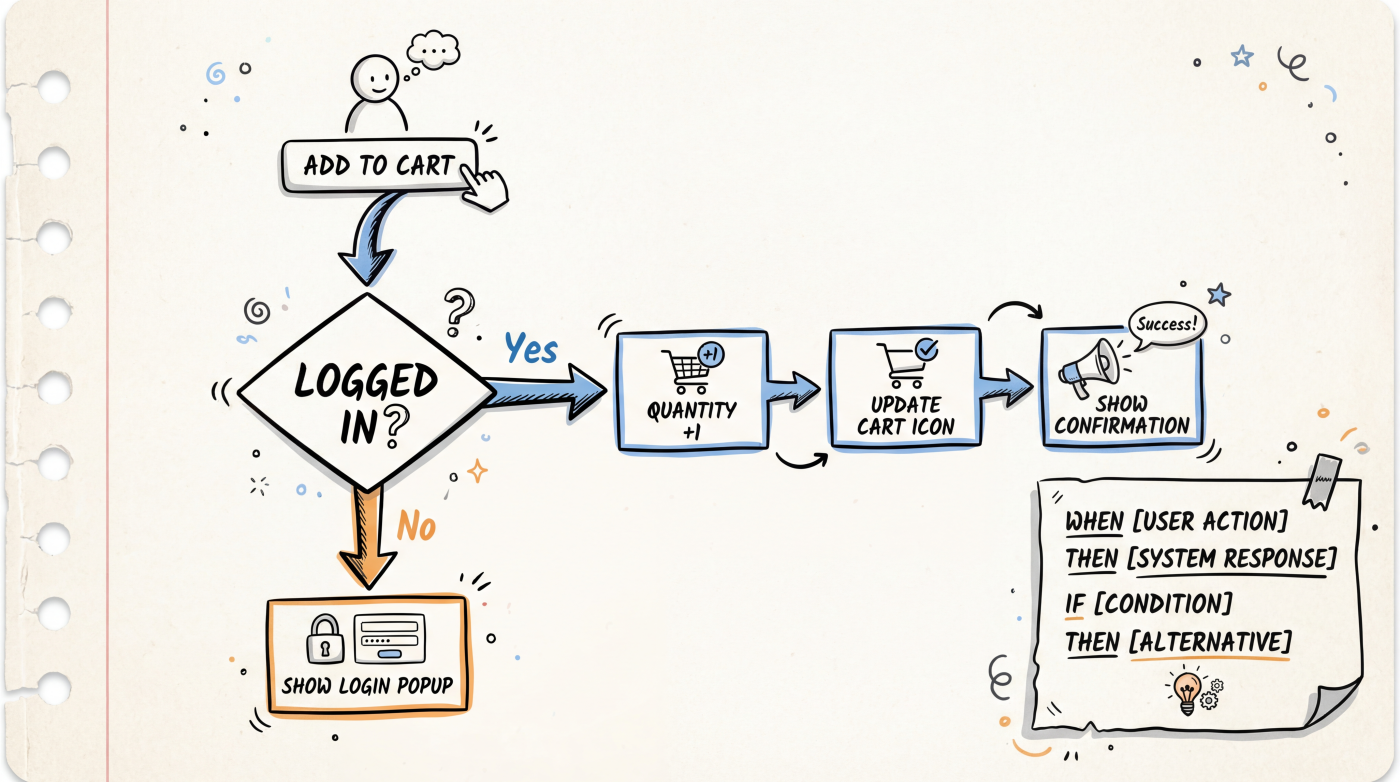
The simplest way to describe logic is the "when... then..." pattern:
When the user clicks the "Add to Cart" button:
- Item quantity increases by 1
- Button changes to "Added", reverts after 2 seconds
- Cart icon in the top right shows the total item count
- If the user is not logged in, show a login modal
This style is intuitive and clear. AI can translate it directly into code logic.
Describe User Flows
For multi-step features, use a numbered list to describe the full flow:
User registration flow:
1. User enters their email and clicks "Send Verification Code"
2. System sends a 6-digit code to the email
3. User enters the code and clicks "Verify"
4. Verification succeeds -> redirect to the set-password page
5. Verification fails -> show an error message, allow resend (60-second cooldown)
6. User sets a password (minimum 8 characters) and clicks "Complete Registration"
7. Registration succeeds -> redirect to the homepage
The key is to write out both the happy path and the error paths. AI often forgets to handle error cases. When you call them out explicitly, the generated code will be much more robust.
Describe Data Relationships
When your app involves multiple types of data, tell AI how they relate to each other:
Data models:
- User: email, nickname, avatar, registration date
- Post: title, content, author, publish date, tags
- Comment: content, author, parent post, publish date

Relationships:
- A user can publish multiple posts
- A post can have multiple comments
- A comment belongs to one user and one post
This kind of description helps AI correctly design database schemas and API endpoints.
Describe Conditions and Rules
Business rules are clearest when written as a list of conditions:
Coupon usage rules:
- Each user can use each coupon only once
- Coupons have an expiration date; expired coupons cannot be used
- Order total must exceed the coupon's minimum spend threshold
- Only one coupon can be applied per order
- The discount amount cannot exceed the order total
Listing rules one by one is far clearer than writing a big paragraph. AI will turn each rule into a corresponding code check.
Use Analogies for Complex Logic
When the logic gets complicated, analogies help AI understand your intent:
"Build a feature like WeChat red envelopes: the user sets a total amount and a number of shares, the system randomly distributes the amount across shares, ensuring each share is at least 0.01, and all shares add up to the total."
"Build a product filter like Taobao: filter options on the left (price range, brand, rating), matching product list on the right that updates in real time whenever any filter changes."
Referencing well-known product features lets AI quickly grasp what you want, saving you a lot of explanation.
A Template for Describing Logic
Feature: [feature name]

Trigger:
- When [condition] occurs

Happy path:
1. [Step 1]
2. [Step 2]
3. [Step 3]

Error handling:
- If [error case 1] -> [how to handle]
- If [error case 2] -> [how to handle]

Business rules:
- [Rule 1]
- [Rule 2]

Data involved:
- [Data type 1]: [field list]
- [Data type 2]: [field list]
You don't need to fill in every section every time. For simple features, "trigger + happy path" is often enough.
Next Up
- Iterative Prompting -- Refining results through multiple rounds of conversation
- Common Mistakes -- Avoiding the most frequent prompt pitfalls