How Apps Actually Work
Frontend, backend, and databases explained with analogies
You don't need to write code, but you do need a rough idea of what an app is made of. Think of it like cars -- you don't need to be a mechanic, but knowing what the engine, transmission, and fuel tank each do helps you communicate with one.
Same idea here -- understanding the basic structure of an app helps you tell AI exactly what you want.
The Restaurant Analogy
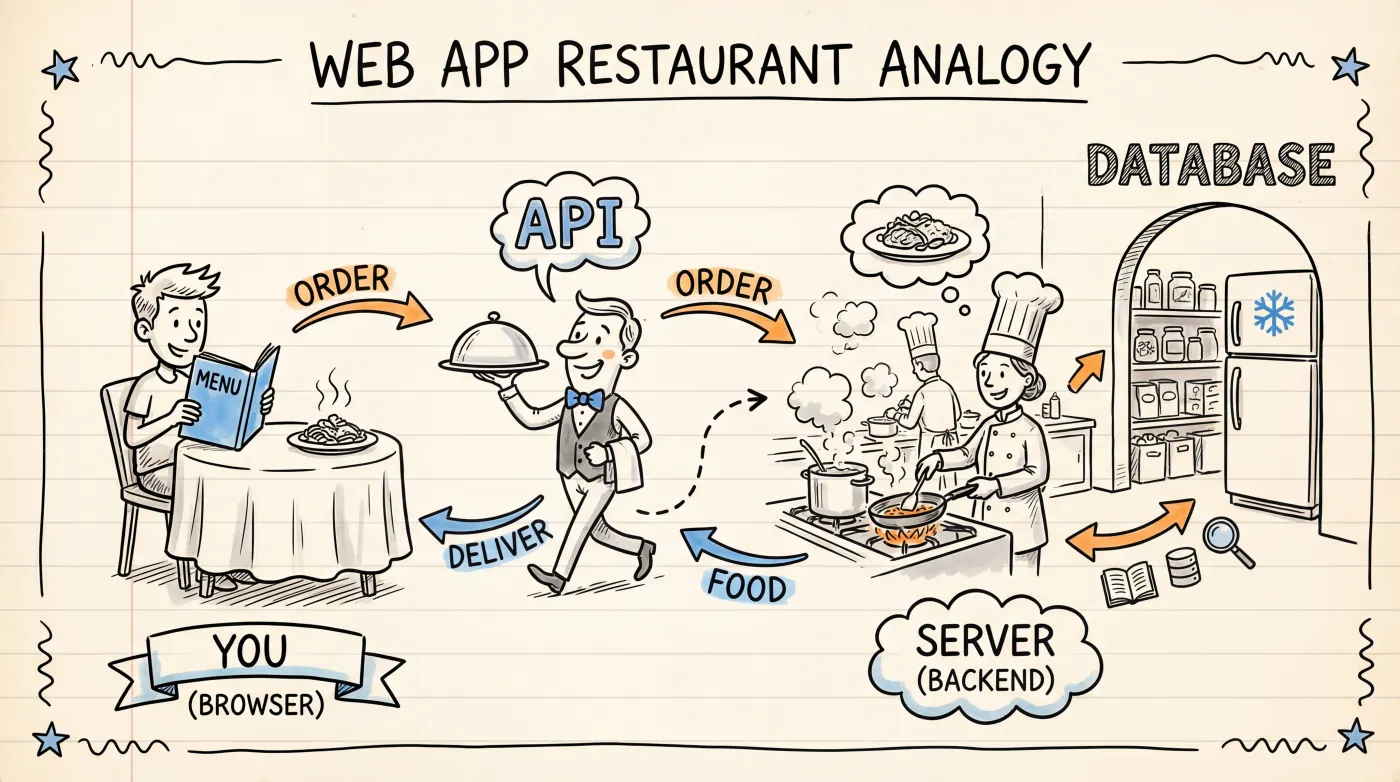
A web app is a lot like a restaurant:
| Restaurant | App | Role |
|---|---|---|
| Dining room + menu | Frontend | What you see: buttons, text, images |
| Waiter | API | Carries information between frontend and backend |
| Kitchen | Backend | Handles logic: authentication, pricing, content generation |
| Storage / fridge | Database | Stores data: user info, order records, articles |
You (the customer) sit in the dining room, look at the menu, and order a steak. The waiter takes your order to the kitchen. The chef grabs ingredients from storage, cooks the dish, and the waiter brings it back to you.
Apps work the same way: you click "Log in" in the browser (frontend), the request travels through an API to the server (backend), the backend checks your credentials against the database, and sends the result back to you.
Frontend: Everything You See
The frontend is the part users interact with directly -- open a webpage, and everything you see is the frontend.
It's built with three technologies:
HTML-- Content structure. Headings, paragraphs, buttons, images. Think of it as the skeleton of a house.CSS-- Visual styling. Colors, fonts, spacing, animations. The interior design of the house.JavaScript-- Interactive behavior. Clicking a button opens a menu, form validation, dynamic content loading. The electrical wiring and switches.
You won't be writing any of these in Vibe Coding, but when AI says "I modified the CSS styles" or "this is a JavaScript error," you'll know what it's talking about.
Backend: The Logic Behind the Scenes
The backend is the part users never see, but it does most of the heavy lifting:
- Authentication -- Is the password you entered correct?
- Business logic -- How do you calculate the shopping cart total? Can this coupon be applied?
- Database interaction -- Storing new users, querying orders, updating inventory
- External services -- Sending emails, processing payments, calling AI APIs
The backend is typically written in Python, JavaScript (Node.js), Go, or similar languages. Full-stack apps generated by AI tools usually include both frontend and backend code.
Database: The App's Memory
An app without a database is like a person with amnesia -- every time you refresh the page, all data disappears.
Databases handle persistent storage. Your account, your published articles, your uploaded images -- all stored in the database.
There are two main types:
| Type | Examples | Characteristics |
|---|---|---|
| Relational | PostgreSQL, MySQL, SQLite | Data organized like spreadsheets with rows and columns, strictly structured |
| Document-based | MongoDB | Data stored like JSON files, flexible structure |
For Vibe Coding projects, you don't need to pick a database yourself -- just tell AI "I need to store user data" and it'll choose an appropriate one.
API: The Bridge Between Frontend and Backend
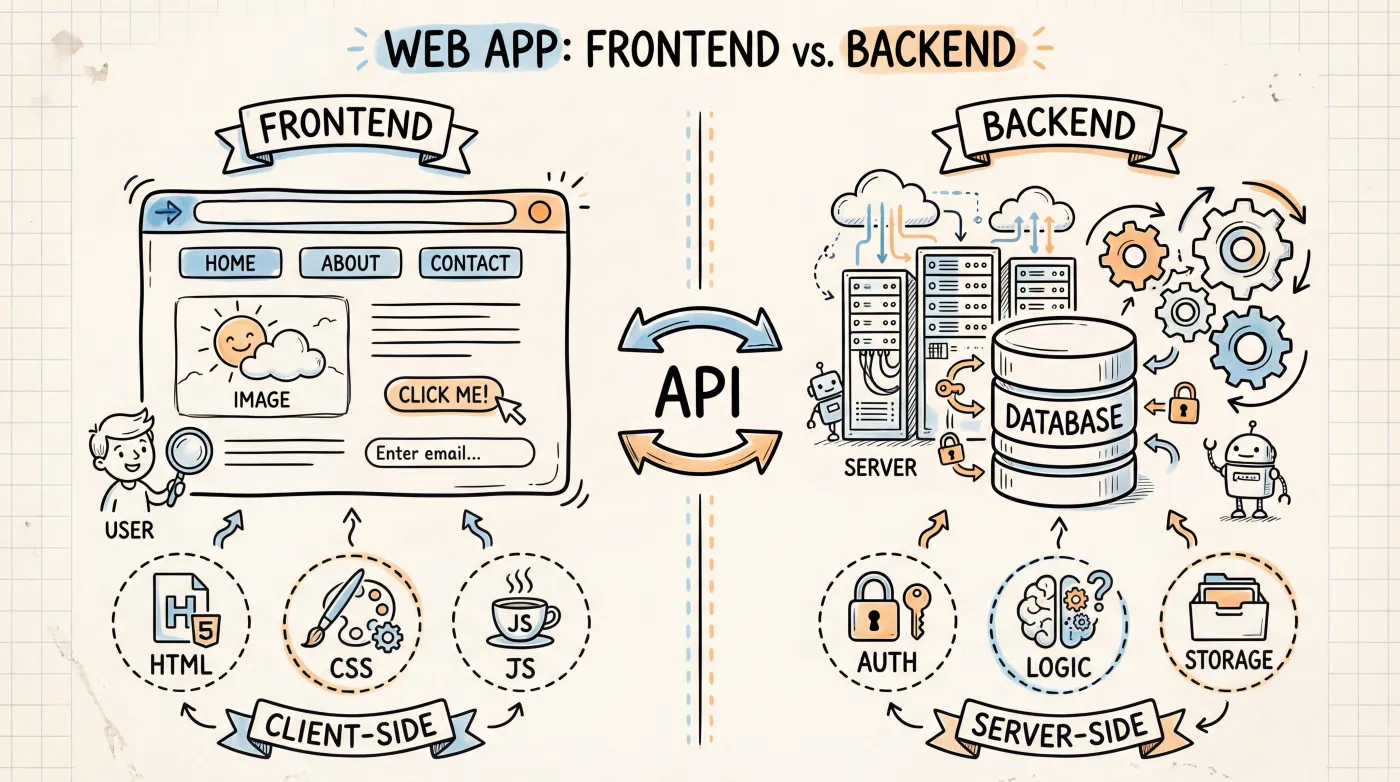
An API (Application Programming Interface) is the communication protocol between frontend and backend.
Think of it as the restaurant's order form -- it defines what you can order (available requests), what information each dish requires (parameters), and what you'll get back (response data).
A typical API interaction:
Frontend sends request: GET /api/users/123
Meaning: Give me the info for user with ID 123

Backend returns response:
{
  "name": "Jane Doe",
  "email": "[email protected]"
}
When an AI-generated app breaks, the problem often lives at the API layer -- the frontend sent a request, the backend didn't handle it correctly, or the response data format was wrong. Knowing this concept helps you describe issues more accurately.
The Full Journey of a Request
When you open a webpage in your browser, here's what happens behind the scenes:
- You type a URL in the browser and hit Enter
- The browser sends a request to the server
- The server's backend code processes the request, possibly querying the database
- The backend sends the result (HTML, data) back to the browser
- The browser renders what it received into the page you see
- You click a button, and the frontend's JavaScript sends a new API request
- The backend processes it, returns the result, and the frontend updates the page
The whole thing happens in milliseconds. Every time you refresh a page, click a button, or submit a form, you're repeating this cycle.
What This Means for Vibe Coding
With these concepts under your belt, you can be much more precise when talking to AI:
| Not great | Better |
|---|---|
| "The page is wrong" | "The frontend is showing empty data -- the API request might have failed" |
| "Add a feature" | "Add a backend API endpoint that returns the user's order list" |
| "The data is gone" | "Data disappears after refreshing -- is it not being saved to the database?" |
You don't need to understand every technical detail. Just knowing the roles of frontend, backend, database, and API is enough.
Next Up
- Reading Code -- We won't teach you to write code, but we'll show you how to read what AI generates
- File Structure -- Understand how all those folders and files in a project are organized