How to Describe the UI You Want
Describe UI layout and interactions using words
"Make it look nice" -- that's the prompt AI dreads the most. What does "nice" mean? Rounded corners or sharp edges? Dark or light? Card layout or list layout?
AI can't read your mind. You need to learn how to put the picture in your head into words. The good news: you don't need a design background -- just a few dimensions to think about.
Four Dimensions of UI Description
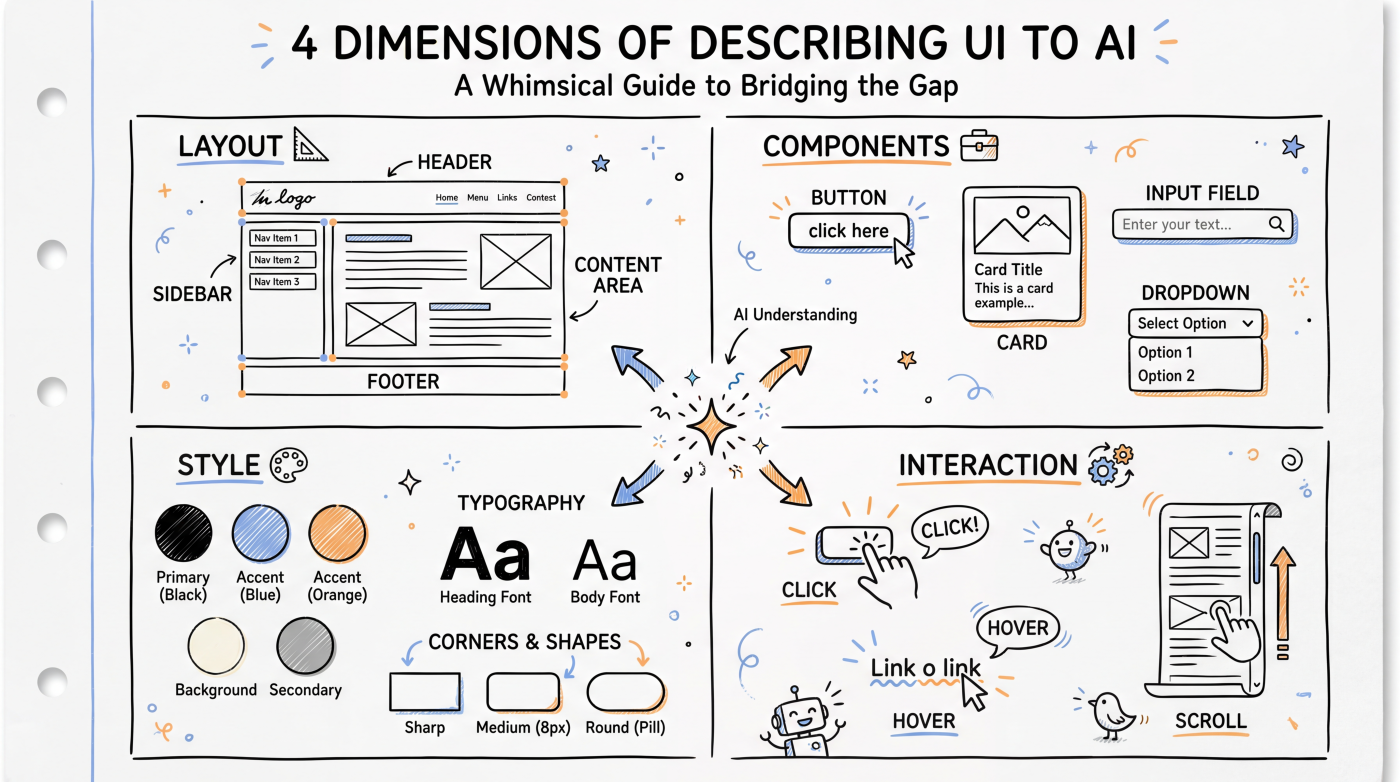
| Dimension | What to describe | Example |
|---|---|---|
| Layout | How elements are arranged | "Top nav bar, two columns below, left sidebar takes up 1/4" |
| Components | What's on the page | "A search box, a filter dropdown, a product card grid" |
| Style | What it looks like | "Rounded cards, light gray background, blue accent color, sans-serif font" |
| Interaction | How it behaves | "Click a card to expand details, card lifts slightly on hover" |
You don't need to cover all four dimensions every time. But when AI's output doesn't match your expectations, check whether you left one of them unclear.
Layout: Start with the Skeleton
Layout is the most important part. Tell AI the overall page structure first, then fill in the details.
Describe from top to bottom, left to right:
"The page has three sections:
- Top: a fixed nav bar with the logo on the left and a login button on the right
- Middle: two-column layout, article table of contents on the left (250px wide), article content on the right
- Bottom: footer with centered copyright info"
Use grids for complex layouts:
"Product list uses a 3-column grid, 3 cards per row, 16px gap between cards. On mobile, it switches to a single column."
Components: Spell Out What's There
List every element on the page and what it contains.
Product card contains:
- Top: product image (16:9 aspect ratio)
- Middle: product name (max two lines, truncate overflow), price (red, bold)
- Bottom: "Add to Cart" button (blue, rounded)
The more specific you are, the closer AI's output will be to what you want. "A card" and "a card with an image, title, price, and button" are worlds apart.
Style: Give Visual Cues
You don't need pixel-perfect specs, but give AI enough visual direction.
Color scheme:
- "Use a dark theme, background #1a1a2e, white text"
- "Match the color style of Stripe's website"
- "Blue and white, clean and minimal"
Typography and spacing:
- "Headings in large bold, body text at 16px regular weight"
- "Leave plenty of space between cards, don't make it feel cramped"
Style references:
- "Something like Notion's clean aesthetic"
- "Similar to Apple's product showcase pages"
Referencing well-known websites is a great trick -- AI has a solid understanding of how those sites look and feel.
Interaction: Describe Dynamic Behavior
Static pages only need layout and style. But if there's interaction, spell that out too:
- "Clicking a nav item smoothly scrolls to the corresponding section"
- "Show a loading state on form submission, then display a success toast"
- "Sidebar is collapsed by default on mobile, opens with a hamburger menu tap"
- "Images can be clicked to view full-size"
A Screenshot Is Worth a Thousand Words
If you have a reference design or spotted a UI you like, sending a screenshot to AI is the most efficient approach.
"Use this screenshot as a reference for layout and color scheme, and build me a similar page. But replace the left sidebar navigation with a top nav bar."
Both Cursor and Claude Code support sending images. A screenshot plus a few lines of modification notes often works much better than a pure text description.
A Complete Example
Build a blog article page.

Layout:
- Fixed nav bar at the top (logo on the left, search box in the center, avatar on the right)
- Content area max width 720px, horizontally centered
- Article title, publish date, body text, and comments section stacked top to bottom

Style:
- Light theme, white background, dark gray body text
- Title 32px bold, body 18px, line height 1.8
- Aim for a reading experience similar to Medium

Interaction:
- Nav bar gets a shadow on scroll
- Code blocks in the article support one-click copy
Next Up
- Describing Logic -- How to explain business logic and data flow to AI
- Iterative Prompting -- Refining results through multiple rounds of conversation